Microsoft SwiftKey AI Keyboard screenshot 0Microsoft SwiftKey AI Keyboard screenshot 1Microsoft SwiftKey AI Keyboard screenshot 2Microsoft SwiftKey AI Keyboard screenshot 3Microsoft SwiftKey AI Keyboard screenshot 4Microsoft SwiftKey AI Keyboard screenshot 5Microsoft SwiftKey AI Keyboard screenshot 6Microsoft SwiftKey AI Keyboard screenshot 7
Microsoft SwiftKey AI Keyboard Icon

Microsoft SwiftKey AI Keyboard

SwiftKey
Trustable Ranking IconTrusted
Downloads1B+
Rating4.37
Size35.5MB
AgeAge ratingPEGI-3
Android Version8.1.0+
Download logoDownloadwith Aptoide
DetailsReviewsVersionsInfo

Description of Microsoft SwiftKey AI Keyboard

Microsoft SwiftKey is an intelligent keyboard application designed for the Android platform, enabling users to enhance their typing experience. It is commonly referred to simply as SwiftKey. This app employs advanced algorithms to learn and adapt to individual writing styles, allowing for faster and more accurate typing. Users can download Microsoft SwiftKey to take advantage of its wide array of features tailored to improve both efficiency and expression in digital communication.


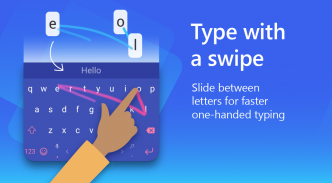
The typing functionality of Microsoft SwiftKey includes both swipe and tap options, offering flexibility in how users input text. The app incorporates a spell checker and an auto-text feature that utilizes artificial intelligence to provide predictive text suggestions. This allows users to type with fewer errors and reduces the time spent correcting mistakes. Additionally, the customizable keyboard toolbar includes quick shortcuts, making it easier to access frequently used functions.


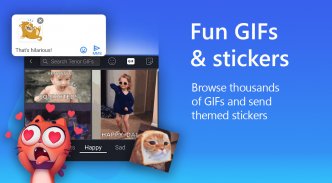
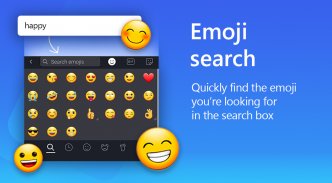
Rich content features are a significant highlight of Microsoft SwiftKey. Users can express themselves through the use of emojis, GIFs, and stickers. The adaptive emoji keyboard learns from users' preferences, predicting their favorite emoticons for various conversations. Furthermore, users can search for specific emojis and GIFs, ensuring they find the perfect visual representation for their feelings or reactions. The capability to create unique AI-powered images and memes adds another layer of personalization to the communication experience.


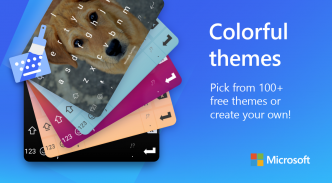
Customization options within the app are extensive. With over 100 colorful keyboard themes available, users can select designs that resonate with their personal style. For those who want a more individualized touch, the option to create a custom keyboard theme using personal photos as backgrounds is available. Additionally, users can adjust the keyboard size and layout to suit their typing preferences, ensuring comfort during use.


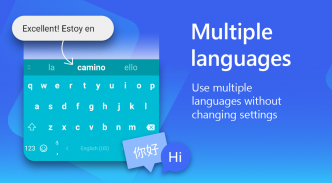
Microsoft SwiftKey supports multilingual typing, enabling users to enable up to five languages simultaneously. This feature is particularly beneficial for bilingual or multilingual individuals who frequently switch between languages while communicating. The app supports over 700 languages, making it a versatile tool for users from diverse linguistic backgrounds.


The intelligent learning aspect of Microsoft SwiftKey differentiates it from other keyboard apps. As users type, the app continually learns their unique slang, nicknames, and frequently used phrases. This personalized approach means that the keyboard becomes more attuned to each user's communication style over time, enhancing the overall typing experience.


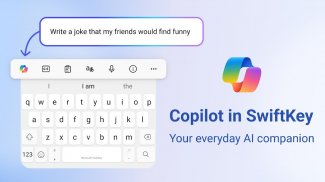
An additional feature is the integration of Copilot, an AI companion that assists users within their favorite applications. This tool allows users to ask questions and receive assistance directly from the keyboard interface, streamlining tasks and improving productivity.


Microsoft SwiftKey also places a strong emphasis on accessibility. The app's design caters to various typing preferences, from those who prefer to swipe to type to those who favor tapping. This inclusivity ensures that a wide range of users can effectively utilize the keyboard, regardless of their typing style.


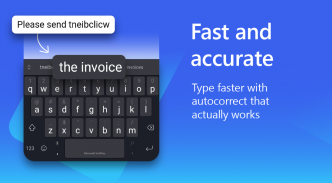
The autocorrect functionality in Microsoft SwiftKey is designed to be intuitive and effective. By understanding context and user behavior, the app provides corrections that make sense, allowing for seamless communication without constant interruptions for manual corrections. This is especially useful in fast-paced conversations where speed is essential.


Moreover, the app's user interface is designed to be user-friendly, making it easy to navigate through settings and features. Users can quickly access customization options, language settings, and other features without feeling overwhelmed, ensuring a smooth user experience.


In terms of security, Microsoft SwiftKey prioritizes user privacy. The app does not store sensitive information, helping users feel secure while typing personal messages or sensitive data. This commitment to privacy is an important aspect for many users in today's digital environment.


Users can also benefit from regular updates that enhance the app's functionality and introduce new features. These updates ensure that Microsoft SwiftKey remains competitive and continues to meet the evolving needs of its user base.


With its range of features designed for personalization, efficiency, and expression, Microsoft SwiftKey stands out as a comprehensive keyboard solution for Android users. The combination of intelligent text predictions, rich content capabilities, extensive customization options, and a focus on user privacy makes it a valuable tool for anyone looking to improve their typing experience.


For those interested in enhancing their typing efficiency and expression, downloading Microsoft SwiftKey offers a straightforward way to access these innovative features. By integrating advanced technology with user-centered design, Microsoft SwiftKey continues to serve as a leading choice for keyboard applications on Android devices.


Find out more about Microsoft SwiftKey’s key features: https://www.microsoft.com/swiftkey

Microsoft SwiftKey AI Keyboard - Version 9.12.18.12

(20-11-2025)
Other versions
What's new* We've made it easier than ever to split, shrink and float your keyboard on large devices and foldables. Find it under "Mode" in your keyboard's toolbar.* You can get real time grammar corrections in most languages including English, Spanish, German, French and others.

There are no reviews or ratings yet! To leave the first one please

-
1308 Reviews
5
4
3
2
1

Microsoft SwiftKey AI Keyboard - APK Information

APK Version: 9.12.18.12Package: com.touchtype.swiftkey
Android compatability: 8.1.0+ (Oreo)
Developer:SwiftKeyPrivacy Policy:https://go.microsoft.com/fwlink/?LinkId=521839Permissions:22
Name: Microsoft SwiftKey AI KeyboardSize: 35.5 MBDownloads: 1BVersion {{version}}: 9.12.18.12Release Date: 2025-12-07 02:30:56Min Screen: SMALLSupported CPU:
Package ID: com.touchtype.swiftkeySHA1 Signature: D5:74:80:03:CD:4B:F7:3C:7A:46:8E:EB:36:CA:EC:84:B7:78:5C:26Developer (CN): TouchType LimitedOrganization (O): TouchType LimitedLocal (L): LondonCountry (C): GBState/City (ST): London

Latest Version of Microsoft SwiftKey AI Keyboard
9.12.18.12Trust Icon Versions
20/11/2025
1B downloads24.5 MB Size
Download

Other versions

9.12.17.15Trust Icon Versions
28/10/2025
1B downloads25 MB Size
Download
9.12.16.16Trust Icon Versions
16/10/2025
1B downloads25 MB Size
Download
9.12.15.12Trust Icon Versions
2/12/2025
1B downloads25.5 MB Size
Download
9.12.14.17Trust Icon Versions
1/12/2025
1B downloads25.5 MB Size
Download
9.12.13.13Trust Icon Versions
6/12/2025
1B downloads23 MB Size
Download
9.12.12.8Trust Icon Versions
7/12/2025
1B downloads23 MB Size
Download
9.12.11.16Trust Icon Versions
5/12/2025
1B downloads23 MB Size
Download
9.10.63.16Trust Icon Versions
2/12/2025
1B downloads22.5 MB Size
Download
9.10.62.18Trust Icon Versions
2/12/2025
1B downloads23 MB Size
Download
appcoins-gift
Level Up GamesGet up to 30 % cashback!
More
Sea War Raid
Sea War Raid icon
Download
ResQRush
ResQRush icon
Download